

Microsoft Copilot

AI assistant for productivity and document workflows in nonprofits

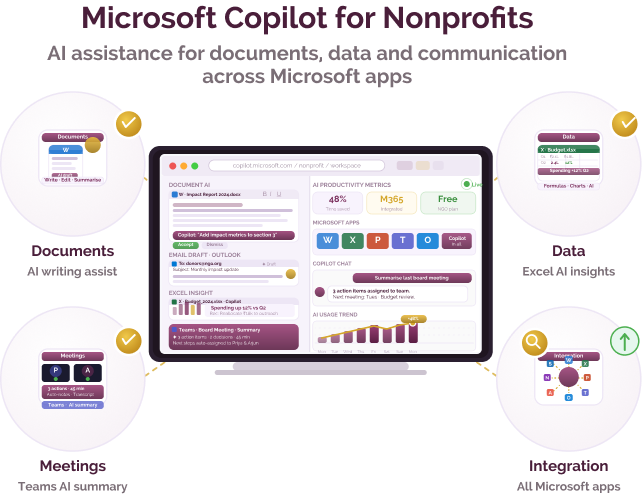
Microsoft’s Microsoft Copilot is an AI assistant integrated into Microsoft tools such as Word, Excel, Outlook, and Teams. It helps nonprofits and social purpose organisations generate content, analyse data, summarise information, and support everyday workflows within familiar applications.
Communication and workflow challenges for nonprofits and social purpose organisations

Challenge
check

Drafting documents, emails, and reports can take time

check

Analysing data in spreadsheets may require effort and expertise

check

Managing communication and tasks across tools can be fragmented

Solution
check

Tools like Microsoft Copilot help organisations generate content, summarise information, and assist with data and workflow tasks within existing Microsoft applications.

Key capabilities of Microsoft Copilot

Four core capabilities that support AI-assisted productivity:

Content generation in documents

Generate drafts, summaries, and edits within tools like Word and Outlook.

Data assistance in spreadsheets

Analyse data, generate insights, and assist with formulas in Excel.

Meeting and communication support

Summarise meetings, draft responses, and assist with communication in Teams and Outlook.

Integration across Microsoft tools

Work within the Microsoft ecosystem, supporting workflows across multiple applications.

Pricing for nonprofits

Paid plans

  • Available as part of Microsoft 365 subscriptions with additional Copilot licensing

Access considerations

  • Requires compatible Microsoft 365 plans and organisational setup

Best suited for which nonprofits?

Organisations using Microsoft tools

Useful for teams already working with Word, Excel, Outlook, or Teams.

Teams managing documents and workflows

Relevant for organisations handling regular reporting, communication, and data tasks.

Similar tools for nonprofit AI assistance

Frequently Asked Questions

What is Microsoft Copilot used for?

Microsoft Copilot is used to assist with writing, summarising, analysing data, and supporting workflows within Microsoft applications.

Is it suitable for non-technical teams?

Yes, it is designed to work within familiar tools, making it accessible for most users.

Is it free for nonprofits?

Copilot is generally available through paid Microsoft 365 plans, though nonprofit pricing may apply to base subscriptions.

Does it work across Microsoft tools?

Yes, it is integrated across applications such as Word, Excel, Outlook, and Teams.

When should a nonprofit choose Microsoft Copilot?

Microsoft Copilot may be suitable when organisations already use Microsoft 365 and want integrated AI support within their workflows.

Want to learn more?

The information provided here is created as a community resource and is not intended as professional advice or a recommendation by ILSS or Koita Foundation. While we strive to ensure the accuracy of the content, we do not take responsibility for any errors or omissions. Users should use their own discretion before making any decisions based on this information. ILSS or Koita Foundation assume no liability for any actions taken based on the information provided.