
Olive Video Editor

Open-source video editing for nonprofit content creation

Olive Video Editor is a free, open-source video editing software that enables nonprofits and social purpose organisations to create and edit video content for communication, awareness, and documentation. It provides basic to intermediate editing capabilities without requiring expensive software.
Content creation challenges for nonprofits and social purpose organisations

Challenge
check

Creating video content can require specialised software and high costs

check

Teams may lack access to professional editing tools

check

Producing videos for campaigns, documentation, or reporting can be resource-intensive

Solution
check

Tools like Olive Video Editor provide accessible video editing capabilities, enabling teams to create and edit content without significant financial investment.

Key capabilities of Olive Video Editor

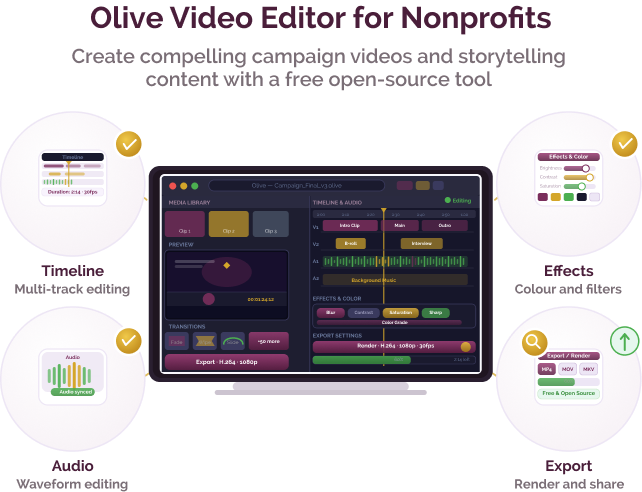
Four core capabilities that support video editing:

Timeline-based editing

Edit video clips using a multi-track timeline for sequencing, trimming, and arranging content.

Basic visual and audio editing

Apply transitions, effects, and audio adjustments to improve video quality.

Open-source flexibility

Access and modify the software without licensing costs, with support from an open-source community.

Export and rendering

Export videos in multiple formats suitable for sharing across platforms.

Indian language support

Olive Video Editor supports multiple languages depending on system settings and community contributions. It can handle multilingual video content based on user inputs.

Pricing for nonprofits

Free and open-source

  • No licensing costs
  • Available for download and local installation

Best suited for which nonprofits?

Organisations with limited budgets

Useful for teams that need video editing capabilities without paid software.

Teams with basic to intermediate editing needs

Relevant for organisations creating simple to moderately complex video content.

Similar tools for nonprofit video editing

Frequently Asked Questions

What is Olive Video Editor used for?

Olive is used by nonprofits to edit video content for communication, documentation, awareness campaigns, and training materials.

Is it free for nonprofits?

Yes, Olive Video Editor is completely free and open-source, with no licensing costs.

Is it suitable for beginners?

It can be used by beginners, but may require some learning compared to simpler video editing tools.

Does it require installation?

Yes, it is desktop software that needs to be installed on a computer.

When should a nonprofit choose Olive Video Editor?

Olive may be suitable when organisations need a cost-free video editing tool and have the capacity to learn basic editing workflows.

Want to learn more?

The information provided here is created as a community resource and is not intended as professional advice or a recommendation by ILSS or Koita Foundation. While we strive to ensure the accuracy of the content, we do not take responsibility for any errors or omissions. Users should use their own discretion before making any decisions based on this information. ILSS or Koita Foundation assume no liability for any actions taken based on the information provided.