

Flux

Managing workflows and processes across systems

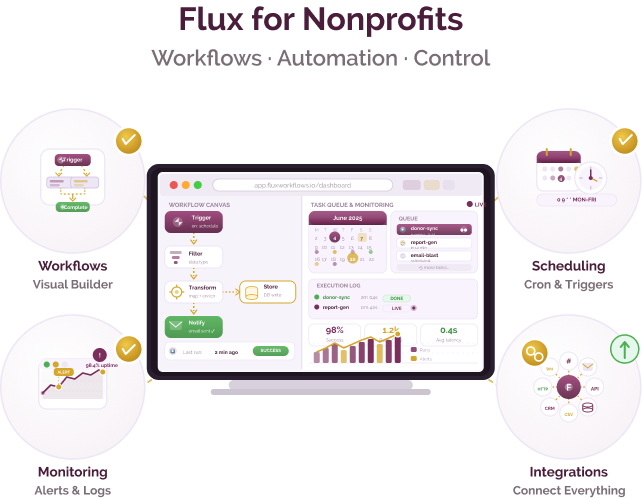
Flux by Flux Corporation is a workflow automation platform that provides tools to design, execute, and monitor complex business processes. It offers features like job scheduling, event-based triggers, process orchestration, and real-time monitoring, managed through a centralized interface.
Managing workflows and processes across systems

Challenge
check

Operational processes span multiple systems (databases, scripts, file transfers) without central coordination

check

Dependencies between steps are difficult to define and manage reliably

check

Limited visibility into workflow execution, delays, or failures

check

Recurring processes require manual intervention, increasing risk of errors

Solution
check

Tools like Flux enable organisations to orchestrate workflows, schedule jobs, and monitor execution across systems from a central platform

Key capabilities of Flux

Workflow orchestration

Design and manage end-to-end workflows with defined task dependencies and execution sequences

Job scheduling and automation

Schedule and automate batch jobs, scripts, and database processes

Execution monitoring

Track workflow runs, logs, and failures with visibility into execution status

File and system integration

Orchestrate file transfers, scripts, and database processes within workflows

Pricing for nonprofits

Custom pricing

  • Pricing is not publicly listed and depends on usage and deployment

Best suited for which nonprofits?

Organisations managing structured operational or data workflows

Teams automating backend processes across systems

Frequently Asked Questions

When is a workflow orchestration tool required?

When processes involve multiple steps, dependencies, or systems that need to be executed, scheduled, and monitored in a coordinated way.

What type of workflows can Flux support?

Structured workflows such as batch jobs, data pipelines, file transfers, and backend process automation with defined sequences and dependencies.

What changes compared to spreadsheets or email?

Workflows are automated and centrally managed, with visibility into execution status, dependencies, and failures instead of manual tracking.

What is required for implementation?

Configuration of workflows, task dependencies, execution schedules, and integration with systems such as databases or scripts.

What are the limitations to consider?

May require technical setup and may not be suitable for highly complex, large-scale orchestration compared to enterprise-grade tools.

Want to learn more?

The information provided here is created as a community resource and is not intended as professional advice or a recommendation by ILSS or Koita Foundation. While we strive to ensure the accuracy of the content, we do not take responsibility for any errors or omissions. Users should use their own discretion before making any decisions based on this information. ILSS or Koita Foundation assume no liability for any actions taken based on the information provided.