

Microsoft Power BI

Data visualisation and business intelligence for nonprofits & SPOs

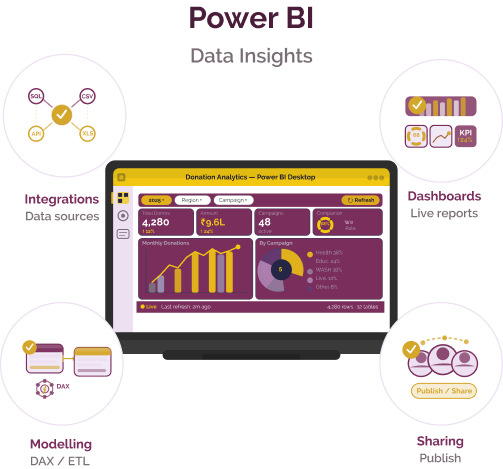
Microsoft Power BI is a data visualisation and business intelligence tool developed by Microsoft that enables organisations to connect data sources, build interactive dashboards, and generate insights for reporting and decision-making.
Microsoft Power BI

Data challenges for nonprofits & social purpose organisations

Challenge
check

Data is often stored across multiple systems, making it difficult to consolidate and analyse.

check

Reporting processes are manual and time-consuming.

check

Limited visibility into programme performance affects decision-making.

Solution
check

Power BI enables organisations to integrate data sources, create visual dashboards, and monitor programme performance in real time.

Key capabilities of Microsoft Power BI

Data integration and connectivity

Connect to multiple data sources, including Excel, databases, cloud services, and APIs.

Interactive dashboards and reports

Create dynamic dashboards with filters, drill-downs, and real-time updates.

Data transformation and modelling

Clean, transform, and structure data using built-in tools such as Power Query.

Collaboration and sharing

Share dashboards across teams and stakeholders through cloud-based access.

Language Support

Power BI supports multiple languages across its interface and reporting environment.

Note: Availability may vary based on configuration and deployment.

Pricing for nonprofits

Free version

  • Basic dashboard creation and data visualisation
  • Limited sharing and collaboration features

Power BI Pro (nonprofit pricing)

  • Per-user subscription
  • Dashboard sharing and collaboration
  • Integration with Microsoft ecosystem

Power BI Premium

  • Advanced analytics and larger data capacity
  • Enterprise-level deployment
  • AI features and enhanced performance

Best suited for which nonprofits?

Organisations with structured data systems

Best for NGOs already collecting data through tools such as Excel, KoboToolbox, or MIS platforms.

Teams requiring advanced reporting

Suitable for organisations needing interactive dashboards and real-time insights.

Organisations using Microsoft ecosystem

Strong fit for teams already using Microsoft 365 and related tools.

Frequently Asked Questions

What is Microsoft Power BI used for?

It is used for data visualisation, dashboarding, and analytics across programme and organisational datasets.

Is it free for nonprofits?

A free version is available, but advanced features require paid plans.

Does it collect data?

No. It connects to existing data sources and visualises them.

Is it easy to use?

Basic dashboards are accessible, but advanced analytics requires training.

Want to learn more?

The information provided here is created as a community resource and is not intended as professional advice or a recommendation by ILSS or Koita Foundation. While we strive to ensure the accuracy of the content, we do not take responsibility for any errors or omissions. Users should use their own discretion before making any decisions based on this information. ILSS or Koita Foundation assume no liability for any actions taken based on the information provided.